LaserJet Printer Repair
LaserJet printer repair involves diagnosing and resolving problems affecting laser printers, including print quality, paper feeding, toner delivery, connectivity, fuser operation, and other internal components. Proper diagnosis helps identify whether a problem can be resolved through cleaning and maintenance or requires component replacement.
Common LaserJet Printer Problems
A laser printer may show different symptoms depending on the failed component or operating condition. Common issues include:
- Printer not turning on
- Paper jams
- Faded or uneven printing
- Black lines or spots
- Repeated marks on pages
- Toner smearing
- Toner not adhering properly
- Slow or incomplete printing
- Cartridge errors
- Network or USB connection problems
- Unusual mechanical noises
- Error or warning messages
Identifying the exact symptom is the first step toward effective repair.
Basic Laser Printer Diagnostics
Begin with a general inspection. Check the power cable, control panel, paper tray, toner cartridge, and visible areas of the printer.
Review any displayed error code or warning message. Many laser printers provide diagnostic information that can help identify paper-path, toner, fuser, or other hardware problems.
Restarting the printer can resolve temporary software or communication issues.
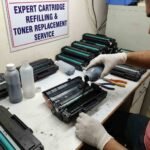
Toner Cartridge Inspection
A low, empty, damaged, or incorrectly installed toner cartridge can cause poor print quality.
Check that the cartridge is the correct model and is seated properly. If prints are faded or uneven, inspect the toner supply and cartridge condition.
Avoid exposing toner unnecessarily and follow the manufacturer’s handling instructions when replacing cartridges.
Print Quality Problems
Poor print quality is one of the most common reasons for laser printer servicing.
Symptoms may include:
- Faded text
- Gray background
- Vertical lines
- Black spots
- Repeated marks
- Smudging
- Uneven density
- Missing areas
The cause may involve toner, the imaging system, transfer components, the fuser, paper, or printer settings.
Printing an internal test or configuration page can help determine whether the issue originates inside the printer or from the computer and print driver.
Drum and Imaging System
The imaging drum transfers the developed image onto the paper. Depending on the printer design, the drum may be integrated into the toner cartridge or installed as a separate component.
A worn or damaged drum can produce repeated marks, lines, spots, or uneven output. If the drum has reached its recommended service life, replacement may be necessary.
Avoid touching the drum surface because fingerprints or damage can affect print quality.
Fuser Problems
The fuser uses heat and pressure to permanently bond toner to the paper.
Fuser problems can cause:
- Toner rubbing off the page
- Smearing
- Repeated print defects
- Paper jams near the output area
- Fuser-related error messages
Because the fuser becomes extremely hot during operation, it should be allowed to cool completely before inspection or servicing.
Paper Feed and Jam Repair
Paper jams may occur because of unsuitable paper, incorrect loading, worn rollers, damaged paper, foreign objects, or problems within the paper path.
Remove jammed paper carefully and inspect the entire paper path for remaining pieces. If jams repeatedly occur in the same location, the relevant rollers, sensors, or mechanical components may require further inspection.
Transfer Components
Laser printers use transfer components to move toner from the imaging system onto the paper. A worn or contaminated transfer component can produce faded output, uneven printing, or other image defects.
These components should be inspected and replaced according to the printer’s service requirements.
Printer Connectivity
If the printer produces internal test pages correctly but does not print properly from a computer, investigate the software side.
Check the USB or network connection, printer driver, print queue, printer status, and selected print settings.
For network printers, confirm that the device is connected correctly and available to authorized users.
Cleaning and Preventive Maintenance
Dust, loose toner, and paper debris can affect printer operation. Accessible areas should be cleaned using methods recommended by the manufacturer.
Regular maintenance may include checking paper-feed rollers, replacing consumables when required, and inspecting components that have reached their service intervals.
When Professional Repair Is Needed
Professional servicing may be required for complex faults involving the fuser, high-voltage circuitry, power supply, mainboard, motors, sensors, or other internal components.
Laser printers contain high-temperature components and electrical circuits that can present safety risks. Internal repairs should be performed by trained technicians using appropriate service procedures.
Testing After Repair
After servicing, perform several test prints and check:
- Print clarity
- Toner adhesion
- Paper feeding
- Duplex operation
- Printer connectivity
- Error messages
- Overall mechanical operation
For multifunction LaserJet models, also test scanning, copying, and other available functions.
Proper LaserJet printer repair combines systematic diagnosis, careful component inspection, appropriate cleaning, and thorough testing. Addressing toner, paper-feed, imaging, fuser, and connectivity problems early can help maintain reliable printing and extend the printer’s service life.











Reviews
There are no reviews yet.